

Review insights
As the Lifecycle of a Business explains, when a Business status changes to in_review, Middesk has completed its investigation into that Business. You can then make your decision about the business using the insights Middesk provides. Your decision could be:
- Approve the business to use your platform
- Deny approval
- Create an order to have Middesk perform additional research
Middesk examines businesses across the follow areas:
- Taxpayer Identification Number (TIN)
- Secretary of State filings
- Addresses
- Business name
- Web presence
- Watchlist screening
- Industry classification
- Phone number
You can look for the results most meaningful to your company’s compliance, fraud, and risk needs.
Access Middesk insights
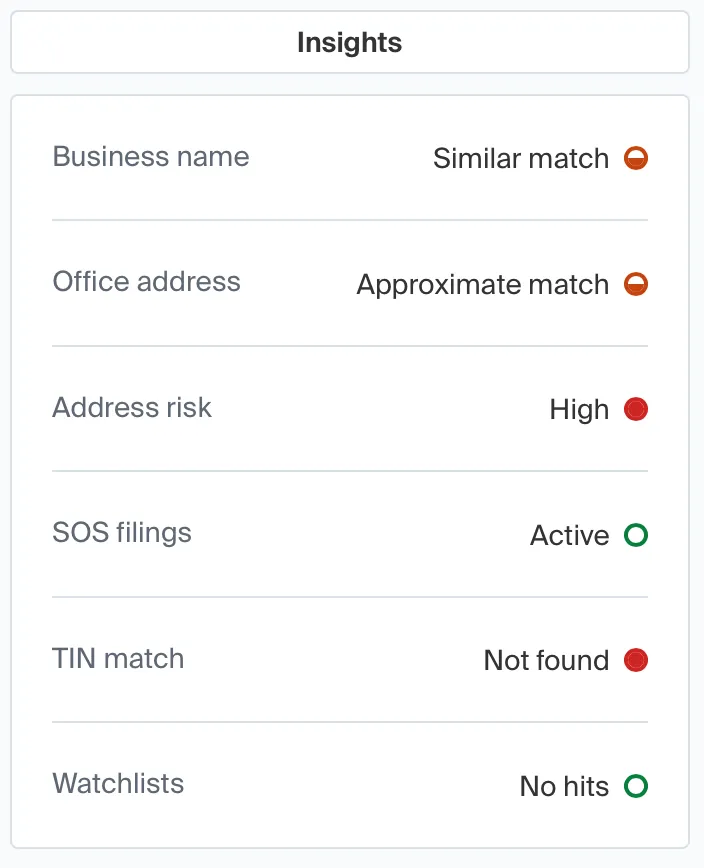
When Middesk completes verification of a business, detailed results show in the Dashboard.
The results derive from how Middesk matches data. The specific business properties reviewed depend upon the information you provide and the orders you request.
Access review tasks in the API
For API-driven integrations, the insights equivalents are stored in the tasks attribute of the Review object:
How to use insights
To illustrate how users might convert Middesk review insights (or tasks in the API) into a decision, a user might auto approve a business if the all following conditions are met:
And one of the two following conditions are true:
To scale this further, you can build custom rulesets in your code or use Middesk’s Policies feature to define approval logic directly in the platform. Learn more
Detailed review task documentation
For detailed information about each review task type, including all possible statuses and messages, see the following pages:
Business verification
Screenings
Online presence
Risk assessment
For a complete reference of all task attributes and structure, see Business review tasks.