

How Signal works
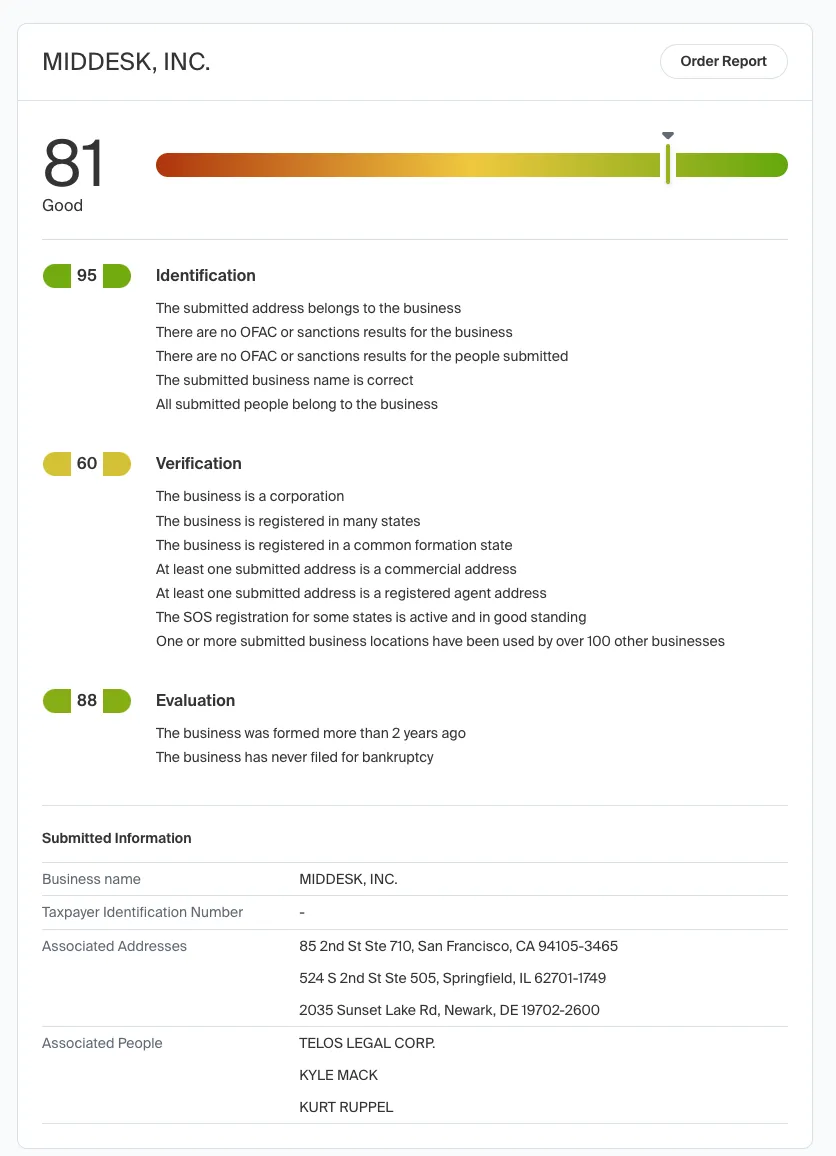
Signal leverages Middesk’s comprehensive data sources to instantly provide a detailed compliance and risk profile for a prospective customer. Signal returns a complete report—a set of scores from 0 to 100, plus reason codes—to help you quickly flag and identify potential risks associated with a customer.
Use cases
Signal is tailored for efficiently screening large volumes of applications at the initial stages of your onboarding process. It provides an instant assessment of a business’s legitimacy and risk profile, making it an ideal solution for high-throughput environments.
Middesk users find Signal particularly useful for:
-
Vendor filtering and pre-qualification: Digital marketplaces and payment platforms use Signal to filter out businesses that don’t meet specific criteria, such as lacking a verified Tax Identification Number (TIN/EIN) or active Secretary of State (SOS) registration. This allows platforms to quickly assess eligibility without needing the full details provided by a comprehensive Middesk verification report.
-
Dynamic onboarding decisions: Adjust your onboarding flow based on factors like entity type or the age of the business, enabling more customized, dynamic application experiences. This enables you to route businesses to enhanced screening based on certain risk criteria and thresholds or quickly disqualify applicants who are high-risk.
-
Low-risk decision making: For cases where trust and safety are a priority, but extensive compliance checks are unnecessary, Signal provides just enough verification to ensure confidence without the need for full due diligence.
-
Historical risk assessments: Conduct a retroactive risk assessment of your existing business customers to ensure there are no active accounts that are fraudulent, high-risk, or non-compliant with your policies, and to inform smarter onboarding decisions for future businesses that exhibit similar risk characteristics.
How scoring works
Signal generates a composite score composed of various reason codes, broken down into three key categories:
- Identification: confirms who the business is.
- Verification: confirms whether the business is legitimate.
- Evaluation: surfaces the risk associated with the business.
Signal scores range from 0.0 to 1.0 in the API and appear as 0 to 100 in the Dashboard, giving businesses a quantified risk assessment.
Reason codes in each category accompany each score. Each reason code starts with the capitalized first letter of its corresponding category, followed by a number.
For example, the Identification reason code I301 indicates that “The submitted business name is correct.” This reason code aligns with the objective of the Identification score, which is to confirm the business’ identity. In the above case, Middesk verified the legal business name.